Solutions for local councils Genesys Cloud help
Telstra CVT calling and contact centre

Cloud calling, contact centre and AI for Australian organisations

Calling for every employee. AI‑powered service for every customer.

Two Telstra products, one accountable partner. Start with a modern contact centre, move staff calling into Microsoft Teams, or connect both into a single service delivered and managed by CVT, Telstra’s Platinum Partner for calling and contact centre.
Compare the options Book a demonstration
Australian data sovereignty Telstra enterprise‑grade carriage Delivered end to end by CVT
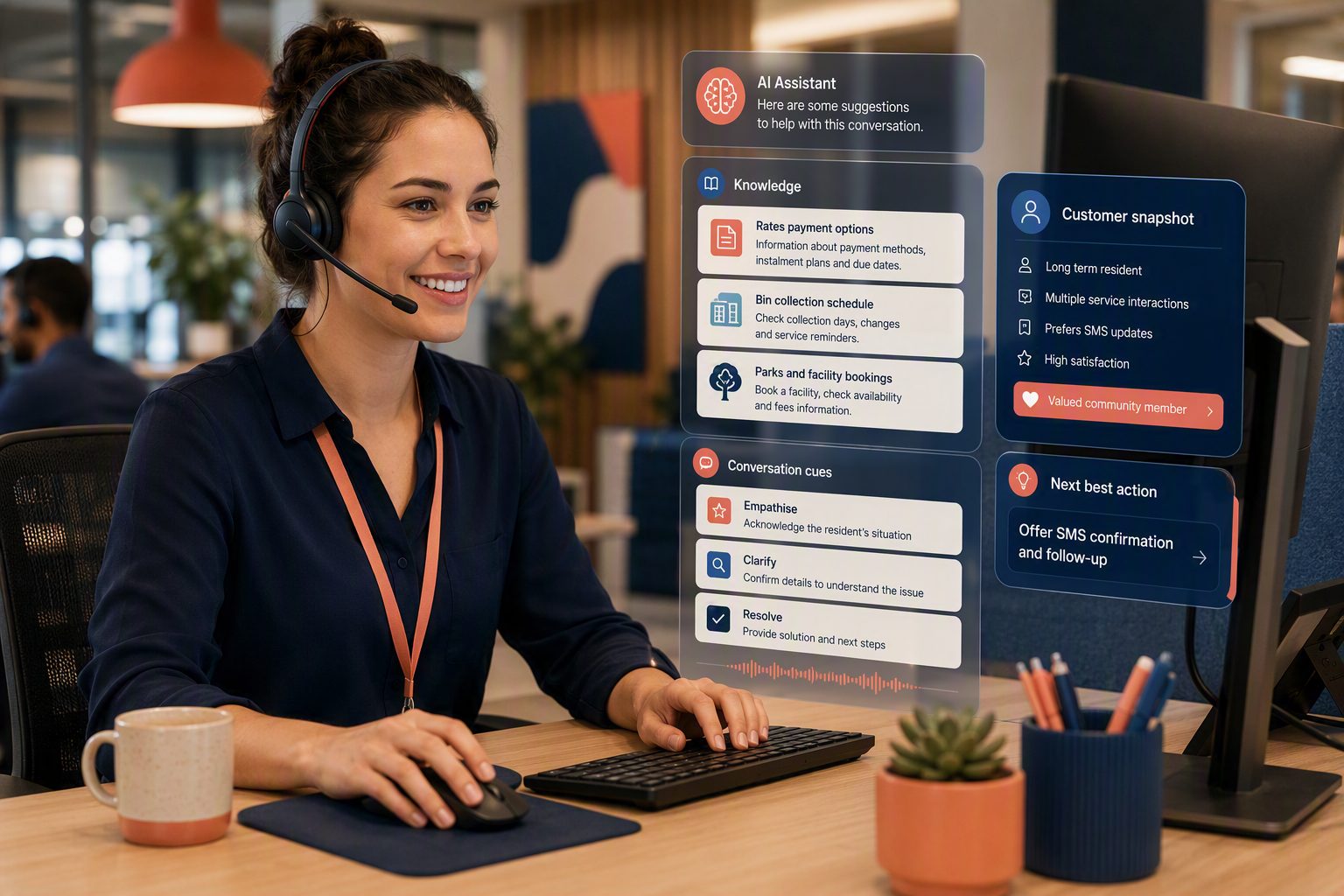
Customer service agent on a headset, with AI suggestions on screen

Telstra Contact Centre Genesys Cloud

An AI‑powered omni‑channel contact centre for your customers: voice, web chat, SMS, email and social in one platform.

About the contact centre

Telstra Operator Connect for Microsoft Teams

Part of Telstra Adaptive Collaboration. PSTN calling inside Teams for every staff member, with no PBX, no SBC and self‑service number management.

About Teams calling

CVT managed service

Design, migration, training and ongoing managed support across both platforms, from one accountable partner.

How CVT delivers

Start where your organisation needs it most

Each product stands on its own. Put them together and a customer’s call can move from the contact centre to a specialist in Teams without losing context.

Genesys Cloud and Operator Connect, delivered by CVT

One service from customer to back office

Customers reach the contact centre on any channel. Agents transfer to specialists and back-office staff in Teams with live presence, and the call never leaves the Telstra network.

Retires The PBX, the contact centre platform and the integration work between them.
A good fit when You want customers and staff on one modern platform, with one partner accountable for all of it.

How it works

1
A customer gets in touch On voice, chat, SMS, email, social or in person.
2
Genesys looks them up CRM and ERP records pulled in via API before the agent answers.
3
Routed to the right agent AI and skills-based routing across every channel.
4
Handed to back office in Teams Directory search, live presence and direct transfer, or after-hours service.
5
Voice of the customer captured Surveys and sentiment feed insight back to service teams.
One number, one identity Presence-aware transfers Telstra carriage end to end One partner

Built for the way your industry serves customers

Customers shouldn’t need to know which team to call. The same routing, self‑service and reporting apply whether you run a service desk, a patient line, a member centre or a retail support team.

Government and public sector Service lines, enquiries and after-hours cover.
Health and community Appointments, triage lines and support services.
Financial services Member and account enquiries, secure payments.
Utilities and infrastructure Faults, outages and account changes.
Education Enrolments, student and parent enquiries.
Retail and consumer Orders, returns and loyalty questions.
Professional services Client lines and reception across offices.
Manufacturing and logistics Orders, dispatch and field teams.

Where AI earns its keep first: the highest‑volume enquiries

Enquiry type AI use case What it changes
Account and billing Bot answers balance and due-date questions, then takes payment securely Peak billing periods covered 24/7
Bookings and appointments Bot checks availability, books or reschedules and confirms by SMS Bookings completed without an agent
Renewals and reminders SMS reminders with a self-serve renewal and payment link Seasonal call spikes flattened
Faults and incidents Bot triages the report, captures location and photo, creates the case Cases raised correctly first time
Status updates Bot answers “where is my order or request up to” from a CRM lookup Status chasing taken off the queue
After hours and urgent Virtual agent resolves routine calls, escalates genuine emergencies Safe, consistent after-hours cover

Bots read and write through your existing CRM and ERP integrations.

Telstra Contact Centre Genesys Cloud

A fully hosted, fully managed contact centre for your customers

Telstra carriage and Genesys Cloud hosted in AWS Australia, with the AI already built in. There is no separate AI platform to buy, host or integrate.

Telstra carriage
Managed end to end
Telstra enterprise-grade carriage
Built-in geo-redundancy
Local, STD and mobile calls within Australia included
Genesys Cloud in AWS Australia
Australian data sovereignty
Cloud-based omni-channel platform
Active/active/active resilience
Rich features with weekly releases
Business outcomes
Free from hardware costs
Rapid deployment; scale and burst on demand
Remote working and business continuity
REST API and an intuitive web interface

AI that answers, assists and improves on every interaction

Simple requests are completed end to end. Complex cases transfer to an agent with identity, intent and context preserved, so customers never repeat themselves.

Before the conversation Deflect and route Virtual agents resolve common enquiries 24/7 on voice, chat and SMS Predictive routing matches each caller to the best-fit agent Predictive engagement offers help before a customer calls
During the conversation Assist the agent Agent Copilot surfaces the right knowledge article Real-time sentiment and next-best-action prompts Live transcription of every conversation
After the conversation Learn and improve Auto-summarisation writes the wrap-up note AI evaluates interactions against your scorecard Topic analytics show why customers are calling

Pick a licence tier

Entitlements are cumulative: each tier includes everything in the tier below it. Choose one to see what your agents get.

GC 1 Included
Voice foundation
Inbound and outbound voice, IVR ACD routing and scheduled callback Dashboards, wallboards and reports Voice and screen recording, monitoring and coaching API access and SSO (e.g. Azure AD) Customisable agent scripting
GC 2 Included
Adds digital and WFO
Email, web chat and SMS Social: X, Facebook, WhatsApp, Instagram Evaluation, scorecards and coaching Knowledge base content and co-browse
GC 3 Selected
Adds full WEM
Post-call and web surveys WFM forecasting and scheduling Performance management and gamification Transcription and sentiment analysis
GC 4 Not in GC 3
Adds AI
Agent Copilot for voice and digital Knowledge article surfacing Suggested wrap codes and summarisation 39 AI tokens per user per month
Digital add-on Requires GC 1
Brings email, web chat, SMS and social channels to a voice-only seat.
WEM add-on Requires GC 1 or GC 2
Surveys, WFM forecasting and scheduling, performance management, transcription and sentiment.
AI Experience tokens Any tier
A pooled, org-level allowance (250 named / 350 concurrent included) that powers Copilot, bots, virtual agents and AI evaluation. Top up as adoption grows.

Also licensed separately and attachable to GC 1 to GC 4: Workitem work automation, native Microsoft Teams integration, CRM integration (Salesforce, Dynamics 365, SAP C4C, ServiceNow, Zendesk) with screen pop and click‑to‑dial, and preview, power and predictive outbound dialers.

Telstra Adaptive Collaboration · Microsoft Operator Connect

One number, wherever work happens

Telstra voice runs natively inside Microsoft Teams, the tool your staff already use every day. No PBX, no SBC. Numbers, users and call capacity are managed in the Adaptive Collaboration self‑service portal.

In the officeTeams desktop client, certified headset or desk phone.
On the moveTeams mobile client and the same business identity.
At homeSecure calling without depending on a site.
Staff working in the office, on the move and at home

Simple pricing

All local, national long‑distance and fixed‑to‑mobile call charges included. Prices ex GST.

You’ll need a Microsoft Teams Phone licence (included with E5, or as an add‑on to E1 or E3) plus a Telstra calling plan.

$0 Phone number No charge to bring or provision a number.
$18 Individual line Premium Calling, per user per month.
$63 Shared line Premium Calling, per line per month. Raise or lower call capacity at any time in the portal.

Standard Teams calling features

Everything a traditional switchboard does today, including auto attendants for business hours and public holidays, and call queues for each team.

With a Teams Premium licence, the native Queues app adds live queue statistics, historical reporting, and monitoring with whisper, barge and takeover.

Local DID number
Inbound and outbound calling
Blind and consult transfer
Delegation (boss mode)
Call park
Call groups
Simultaneous ring and forwarding
Custom outbound caller ID
Hold and music on hold
Call history
Speed dial and favourites
Single-click callback
In-queue callback
Presence
Voicemail with transcription
Text-to-speech greetings
Auto attendant (hours and holidays)
Call queues with 4 routing modes
Power BI queue reporting
CDR admin reporting
On-demand recording

Operator Connect with Telstra

Upload phone numbers to your Microsoft tenant from the self‑service portal Migrate existing numbers at a time that suits you Choice of per‑user or per‑trunk calling plans Business continuity built in

Telstra Cloud Calling, same portal

For lines that aren’t Teams users: community phones, intercoms and fax machines Supports standard SIP and analogue devices Hunt groups, auto attendant, scheduling and receptionist features Optional Webex collaboration add‑ons

Devices for every site

Offices and meeting rooms Microsoft-certified Yealink desk and conference phones, Teams Rooms from huddle to large, and room scheduling panels.
Headsets and speakerphones USB, Bluetooth, DECT and hybrid headsets, managed from the Yealink device platform.
Warehouses, depots and smaller sites Teams-ready DECT cordless systems for sites where staff move around.
Intercoms, ringers and fax Teams-certified Algo and Axis door stations and loud ringers; ATAs for analogue phones and fax.

Better together: one conversation from customer to back office

Contact centre agents search the Teams directory, see live presence and transfer over the Telstra network. Calls stay on Telstra carriage end to end, with one number and one identity across both platforms.

1 Customer gets in touch Any channel: voice, chat, SMS, email, social, web form or in person.
2 Records pulled from CRM Screen pop, interaction history and data lookup via API.
3 Routed to the right agent Omni-channel routing, IVR, recording and WFM in Genesys Cloud.
4 Transferred to back office in Teams Live presence, directory search and direct transfer, or after-hours service.
5 Survey captures feedback CSAT, sentiment and Power BI insight fed back to service teams.
Integrates with your business systemsBi‑directional API integration with Dynamics 365, Salesforce, Oracle Service Cloud, TechnologyOne, Infor, Civica and ServiceNow.
Takes payments securelyA PCI‑compliant payment gateway, in call or through self‑service.
Stays up when a site doesn’tActive/active/active geo‑redundancy, with manual or automatic failover as a business continuity add‑on.

What organisations gain by moving to the cloud

Cost and infrastructure Retire SIP trunks, SBCs and PBXs Remove unnecessary desk phones Hardware-free and simple to scale Stronger continuity, redundancy and availability
Ways of working Hybrid and fully remote working Scale and burst capacity on demand Onboard new staff in minutes, not weeks Teams focused on customers, not the tech
Experience and AI AI and automation across the journey Analytics and sentiment on every interaction CRM, ERP and custom integrations WFM scheduling and PCI-DSS payments

Recent case study

Retiring the legacy phone room

On‑premise PBX hardware, SBCs, SIP trunks and desk handsets were decommissioned. Staff moved entirely to PC and mobile softphones with headsets.

The result: genuine hybrid and remote working, single‑number reach, rapid onboarding and business continuity built in.

One accountable partner, from design to day‑to‑day support

CVT is a Telstra Platinum Partner for calling and contact centre solutions, serving customers throughout Australia and New Zealand from offices in Sydney and Melbourne.

Step 1 Design Map your services, call flows, integrations and licensing to the right mix of products.
Step 2 Migrate Move numbers and sites on your timetable, with independent or combined roll-outs.
Step 3 Train Get agents, supervisors and admins confident with Genesys, Teams and the portal.
Step 4 Manage Ongoing managed support across both platforms from one accountable partner.

Published case studies

Health and community MedHealth Six contact centres brought together in one Telstra Genesys Cloud tenancy, starting with the IT service desk.
Government and public sector Super SA Deployed Telstra Contact Centre Genesys Cloud in September 2020, with the whole deployment completed online.
Financial services ADICA (Aioi Nissay Dowa Insurance) Moved from an on-premises contact centre to the cloud, saving around $150,000 in staff productivity.
Financial services Greater Bank Replaced an ageing legacy contact centre, with the platform implemented in around six weeks.
Local government Hobsons Bay City Council Serving close to 100,000 residents across 12 suburbs west of Melbourne.
Education Christian Education Ministries An omni-channel contact centre set up quickly so staff could work remotely and keep supporting parents and guardians.
Health and community The Salvation Army Moved from disjointed platforms, lifting NPS eight points, with callback used by over 90% of callers.
Read the case studies on cvt.com.au
For local government Solutions for local councils Council services, AI use cases for rates, waste and planning, and how officers hand residents to back-office teams in Teams. Visit the council site Already using Genesys Cloud? Genesys Cloud Help Step-by-step fixes for audio and headset problems, network and browser requirements, and security and compliance answers. Open the help site

See it working for an organisation like yours

Book a demonstration of Genesys Cloud, the Adaptive Collaboration portal and Teams calling, and talk through transition options for your sites.

Talk to the CVT team
General enquiries 1300 000 288 Monday to Friday, business hours (AEST/AEDT)
After-hours emergency +61 3 9385 7475 For urgent, business-impacting incidents
Sydney office 12U, 175 Lower Gibbes Street, Roseville NSW 2069
Melbourne office 230 Plenty Road, Preston VIC 3072
Call 1300 000 288 Email or book online